|
|





|
|
MagSurvey Magnetometer SoftwareThis real-time, map-based logging/plotting/retrieval magnetometer software gives the surveyor the full story of what anomalies are where, and in what direction they scatter -- without buoys, cord grids, or other physical references. Windows-PC-based, MagSurvey supports many magnetometers and operates with modern GPS equipment having full time differential corrections. Whether you are surveying for shipwrecks, pipelines, dump sites, or geological formations, MagSurvey is your best choice for boat-towed and land magnetometer survey software. Now with metal detector support. THE NEW STANDARD FOR MAGNETOMETER SURVEYS -- WITH REAL-TIME 3D VISUALIZATION
Note Reduced MagSurvey Pricing of $295 Recent response from a 6-year user -- "I am very pleased with MagSurvey 3D, It is so much simpler than Geometrics and even Marine Magnetics software. I honestly find that I get more accurate location data from MagSurvey. I have started doing my north south lines and getting my latitude reading from the peak, and then running those latitude lines East/West and get my longitude from the peak of that line. I'm rarely more than 5 feet away. Great package, accurate and easy to use. Thanks!" Download free evaluation program -- See Ordering Information Page |
|||||||
|
|
Selectable Modes for Marine and Land Surveys |
|||||||
|
|
Quick Determination of Positions |
|||||||
|
|
On-Screen, real time Mapping in both 3D and 2D |
|||||||
|
|
On-Screen Magnetometer Graph |
|||||||
|
|
Real-Time, Map-Based Plotting of Anomalies |
|||||||
|
|
Easy Survey Storage |
|||||||
|
|
Easy Survey Retrieval |
|||||||
|
|
Easy Printing of Plotted Charts |
|||||||
|
|
Navigational Assistance |
|||||||
|
|
Efficient Operation |
|||||||
|
|
Easy to Learn |
|||||||
|
|
Communications Support |
|||||||
|
|
Post-Processing Support |
|||||||
|
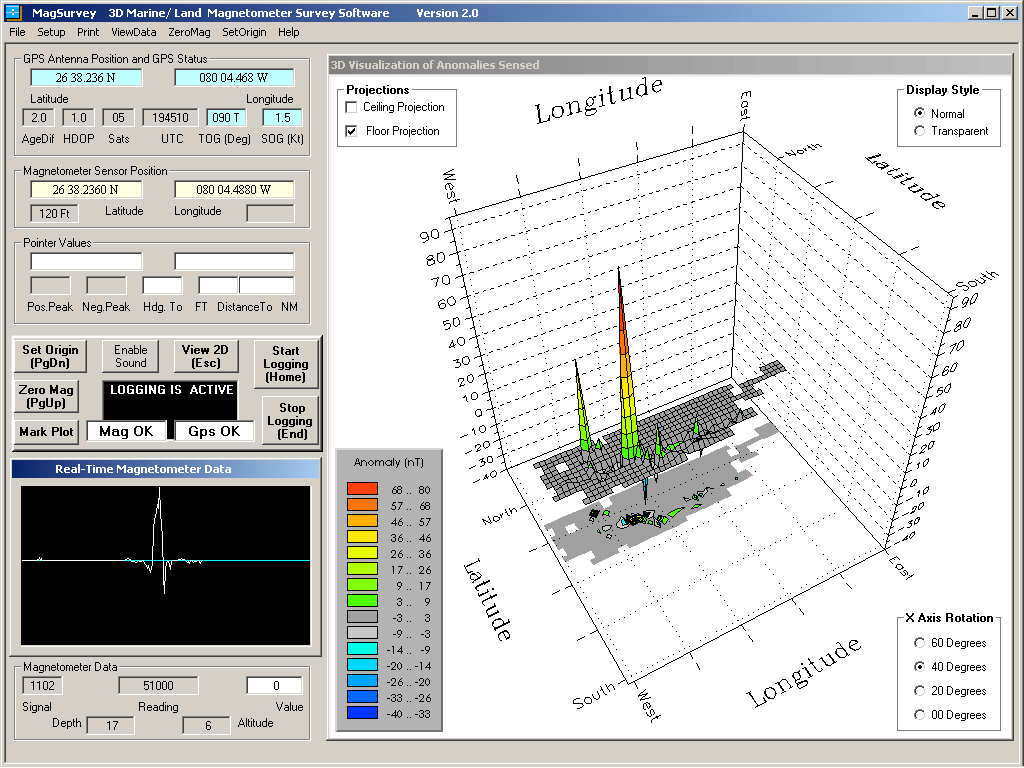
MagSurvey's real-time 3D visualization offers several viewing options
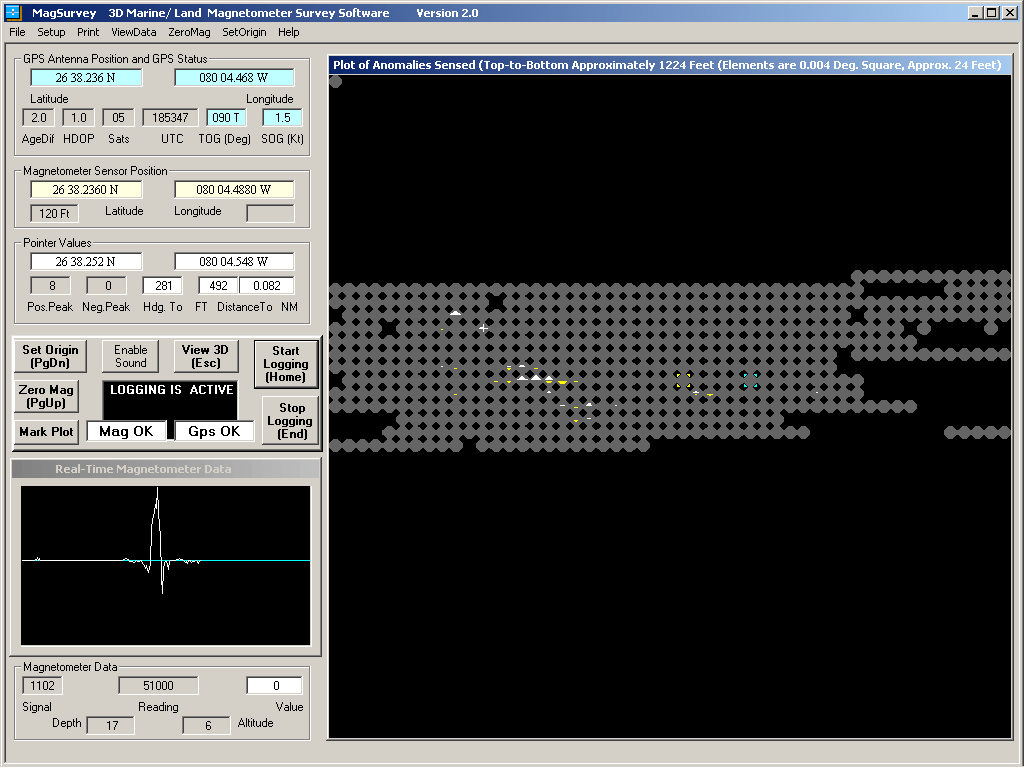
Selected by a single click, the feature-loaded, real-time 2D display is the primary screen for navigation
MagSurvey FeaturesQUICK DETERMINATION OF POSITIONS -- On-screen indication of the sensor position, the position of a user controlled pointer, and the position of the boat or operator. Pertinent differential GPS status information is also displayed on-screen. ON-SCREEN MAPPING AT SIX SCALES -- For primary navigation, the on-screen 2D map operates with "map elements" based on lines of latitude and longitude. As with a navigational chart, the north-south distance of a map element remains constant, while the east-west distance decreases the further the survey area is from the equator. Also, as with a navigational chart, northwest is displayed at the top left of the screen in any hemisphere of operation. Use of the default 0.004 scale is recommended for most marine surveys. Survey On-Screen Map Individual Map Element Scale Best Use Feet Sq. at Equator Feet Sq. at Equator Minutes Lat/Lon Small Land Approx. 306 Approx. 6 0.001 Medium Land/Marine Approx. 612 Approx. 12 0.002 Large Marine Approx. 1224 Approx. 24 0.004 Rough Marine Approx. 2448 Approx. 48 0.008 Coarse Marine Approx. 6120 Approx. 120 0.020 Extra Coarse Marine Approx. 30,600 Approx. 600 0.100 REAL-TIME 3D CHARTING AND 2D MAP-BASED PLOTTING OF ANOMALIES -- Plotting of magnetometer-indicated peak anomalies occurs as the magnetometer sensor passes nearby, allowing for immediate and unmistakable determination of scatter patterns. Map elements passed-through are indicated by gray octagons, making it unlikely that unknown holes will exist in the completed survey. The larger the gamma difference, the larger the displayed arrow pattern. Both positive and negative peaks are accumulated and displayed. Numeric values of positive and negative peak gamma differences are separately stored and can be read by moving the pointer above the map element. The separate, real-time 3D display gives a graphic, high impact indication of the anomalies detected. |
||||||||
|
|
2D/3D -- A single click instantaneously switches between display modes. |
|||||||
|
|
2D -- Positive anomalies plot as sized, white arrow patterns pointing upward. |
|||||||
|
|
2D -- Negative anomalies plot as sized, yellow arrow patterns pointing downward. |
|||||||
|
|
3D -- Positive and negative anomalies display as contoured colors. |
|||||||
|
|
3D -- Quick selection of several views. |
|||||||
ON-SCREEN MAGNETOMETER GRAPH -- On-screen magnetometer graph displays recent anomaly status; adjacent windows display other pertinent magnetometer information. Audible bell sounds can be enabled to indicate when anomalies are sensed. EASY SURVEY STORAGE -- Plots are easily stored to the hard-drive for future reference. The name of each stored file includes the date and time that the file was created and stored. This automatically sorts the files into chronological order by filename. The .CSV files are stored in compact form. If needed, bitmap (.BMP) files may be optionally created and stored from review mode, and offer advantages to printing the screen (these can be displayed and enhanced with Microsoft Paint and other similar programs). The optional .BMP files are approximately 1.4 megabytes each. EASY SURVEY RETRIEVAL -- Stored plots and anomaly data can be easily retrieved from disk storage and displayed in two different modes: |
||||||||
|
|
Review Mode -- This mode loads an earlier survey for analysis. If on-site, the current boat/operator position is superimposed onto the retrieved image. This allows efficient return to any anomaly without the use of buoys or markers. |
|||||||
|
|
Append Mode -- This mode loads an earlier survey for the purpose of surveying areas not fully covered in the original survey. Any subsequent saving of the new composite survey will be recorded under the new date and time, leaving the original file undisturbed. |
|||||||
EASY PRINTING OF PLOTTED MAP -- The 2D and 3D plot can be printed to an attached color printer at any time during survey or retrieval modes of operation. NAVIGATIONAL ASSISTANCE -- On-screen displays of boat/operator distance and heading to any map element beneath the pointer allow for an easy and accurate return to any point of interest. The magnitude of the positive and negative anomalies are also displayed for the selected point. The vector/distance feature can also be used to facilitate the running of grid patterns. EFFICIENT OPERATION -- Convenient grouping of plotting controls allows operation of the software by either pointing device or keyboard. This control grouping includes Zero Magnetometer, Set Origin, Start Logging, Stop Logging, Viewing of 2D/3D chart, and Sound On/Off. this area of the screen also includes displays of overall Magnetometer status, overall GPS status, and status of the Logging operation. EASY TO LEARN -- Learning MagSurvey is made easy by the use of an on-screen manual (just click and press F1 in an area of the screen, or select the Help menu at the top of the screen). Further help is given by pointer-based descriptions of displays (just park the pointer over an item). Another manual is included (MagSurvey.doc) that may be printed using a word processing program. COMMUNICATIONS SUPPORT -- A pop-up screen can be selected to view the incoming messages from the magnetometer and GPS. POST-PROCESSING SUPPORT -- MagSurvey's Review mode is all that most users will ever need for survey analysis. For those users with an interest in post-processing of data or comparison to sunspot activities logged by NASA and other agencies, MagSurvey's comma delimited .CSV survey data file can be read by spreadsheets such as Excel. The file has peak positive and peak negative differences, UTC times, and peak raw values; as well as depth, altitude, and "beenhere" information for each map element. The two raw peak values are stored as milliGammas (picoTeslas) -- all other MagSurvey values are expressed as Gammas (nanoTeslas). Header information displays the date and time of the file save, and the latitude and longitude of the upper left (northwest) map element. The 2601 map elements are stored row-by-row in book form, with 51 elements across by 51 elements down. The center of each map element at the equator is 0.004 nautical miles from the center of each adjacent element for large-scale surveys, 0.002 nautical miles for medium-scale surveys, and 0.001 nautical miles for small-scale surveys -- other more coarse scales are also available. The .CSV files may also be edited with a simple text editor, such as Wordpad -- this can be useful for removing unwanted glitch readings after file save.
Donald O. Land 8117A Northboro Ct, West Palm Beach, FL 33406 USA Tel:561-433-0033 Email: info@magsurvey.com |
||||||||